

4 Of The Best Routers With More Than 4 Ports

We may receive a commission on purchases made from links.
An entry-level router may provide good enough Wi-Fi coverage for the simplest of setups, but many home networks demand more. We're talking dual- and triple-band connectivity, especially if your house or apartment is packed to the brim with internet-connected devices. The ability to assign specific devices to specific bands can help to reduce bottlenecking, but the best way to sidestep Wi-Fi concerns altogether is to take advantage of Ethernet ports.
Most routers — whether a standalone unit or a multi-node mesh system — include both WAN and LAN ports. And while Wide Area Network (WAN) is typically a modem-only connection to an upstream internet connection, the Local Area Network (LAN) is meant for components like game consoles, streaming devices, smart TVs, etc. When they're connected via Ethernet, these devices stop competing with your home's Wi-Fi-only hardware, which often results in a stronger, more reliable network.
Believe it or not, there aren't many routers with more than four LAN ports, but what if that's not enough for your wants and needs? You can always buy an Ethernet switch that interfaces with your router, but we know that buying another component isn't always feasible. To that end, we dug around and were able to find three standalone routers with more than four LAN ports. We'll also be recommending a mesh Wi-Fi system for those in need of a standalone alternative.
Asus RT-BE96U
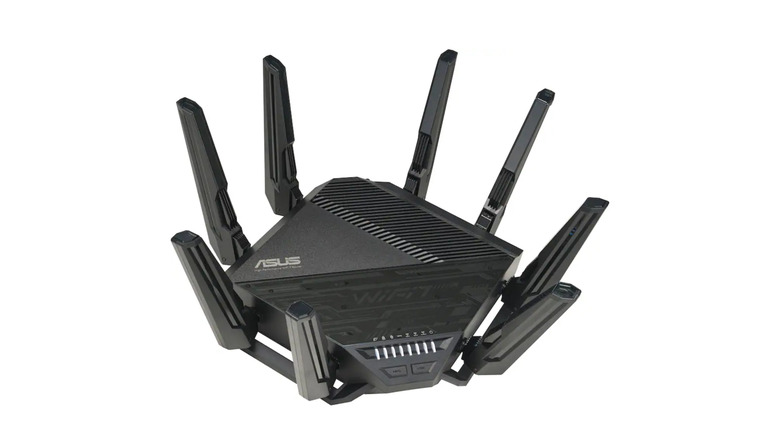
Unfortunately, sometimes the best tool for the job also happens to be the most expensive. The $630 Asus RT-BE96U is one of the company's premium tri-band routers, and while our bank accounts may hate us, our online gaming is going to feel incredible. The RT-BE96U has a total of five LAN ports, one of which may also be configured for WAN duties. Here's the best part: one of those LANs supports up to 10 Gbps. All other ports are 1 Gbps connections, which are ideal for hardwiring PCs, game consoles, and smart TVs.
While it's a bit on the bulky side, the RT-BE96U packs a quadruple heatsink; that's a chassis sacrifice we can stand behind. Setting up the router is pretty straightforward and can be done via a web browser or the Asus Router app. The latter is an intuitive interface with features and settings galore, along with the ability to monitor network traffic and connected clients. The RT-BE96U performed well in Wi-Fi tests, too, and you'll be able to choose between 2.4GHz, 5GHz, and 6GHz bands.
PCMag praised the router's overall performance and 10 Gbps capabilities. Best Buy customers like this product, too; more than 145 users wrote in, earning the RT-BE96U four out of five stars. The majority appreciate the speed and usability, but we read a few reviews that mentioned occasional dropouts.
TP-Link Archer BE800
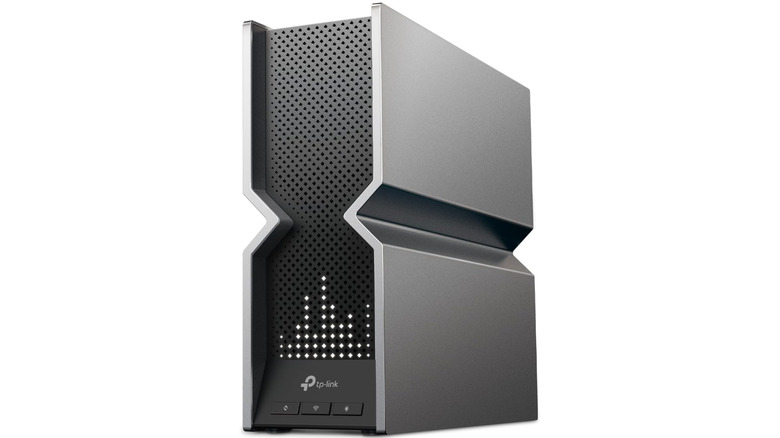
Space-saving designs are hard to come by when you're hunting for multi-port routers, and unfortunately, the $330 TP-Link Archer BE800 is no exception. But if you're looking for a terrific internet hub that'll power your next gaming session or heavy-duty internet workflow, look no further. Let's start with wired connectivity: the BE800 has five LAN ports, four of which are capable of 2.5 Gbps speeds. The other port supports up to 10 Gbps, and you'll have 2.4GHz, 5GHz, and 6GHz Wi-Fi bands to work with, too.
According to TP-Link, the BE800 maxes out at 11,520 Mbps (6GHz), and offers features like Multi-Link Operation, 4K QAM, and 320 MHz performance. Tom's Guide reported "excellent throughput at short range," which bodes well for Wi-Fi devices that live close to your router. We also like the fact that the BE800's eight antennas are internal; no extraterrestrial-looking plastic towers on the outside! The router is mesh-compatible, too, allowing you to configure it as a node for larger TP-Link networks.
On Amazon, the BE800 scored four out of five stars, based on over 500 user reviews. Most individuals love the router's fast speed, easy setup, and 2.5 Gbps connectivity. Something to be aware of: a handful of users reported a dead or dying BE800 after just several months of use. This doesn't seem to be a bigger quality control issue, but rest assured that the BE800 does come with a two-year limited warranty.
TP-Link Archer AXE300
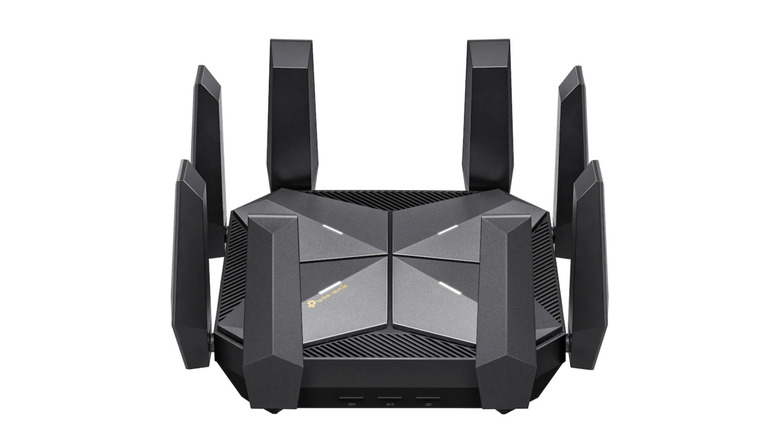
Next up is another TP-Link standalone router, and this one offers a whopping six LAN ports for all your wired needs. The $300 TP-Link Archer AXE300 is a quad-band Wi-Fi 6E router with two 5GHz bands, as well as 6GHz and 2.4GHz connections. TP-Link claims you'll get up to 4,804 Mbps when using the 5GHz and 6GHz bands, but the real bandwidth is supplied by the LAN hookups. Two of the ports support speeds up to 10 Gbps, while the other four are rated for 2.5 Gbps speeds.
We have it on good authority that the AXE300 setup is a breeze, especially when using the TP-Link Tether app. Monitoring and customizing your network feels quick and intuitive, thanks to a well-optimized interface that prioritizes Wi-Fi essentials. You'll also be able to enjoy features like TP-Link's OneMesh technology (configure the router as a node) and HomeShield software. However, the latter does lock a number of advanced settings behind a subscription paywall.
Android Central gave the AXE300 a near-perfect 4.5 out of five star rating, and Best Buy shoppers felt just as positive. While only 19 user reviews were available at the time of writing, the router still earned 4.9 out of five stars. One user wasn't a big fan of the price, but $300 isn't all that bad for a great router; perhaps they bought the AXE300 when it was still $600.
Eero 6+ (3-Pack)
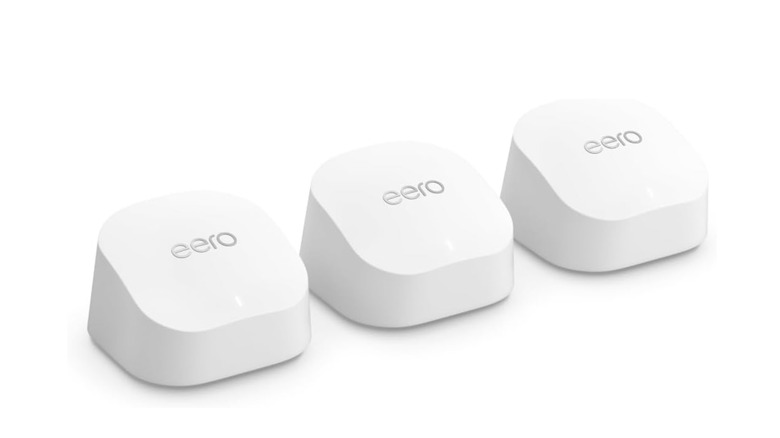
We wanted the main focus of this roundup to be standalone routers, but we also wanted to highlight a mesh Wi-Fi system for the largest homes and businesses. We chose the $300 Eero 6+ (3-Pack) because, between the main unit and two satellites, the system offers five 1 Gbps LAN ports. A convenient auto-sensing feature recognizes when you're wiring up a modem, too, so you shouldn't have to manually configure anything.
The Eero 6+ offers dual-band connectivity, and Amazon claims the three-pack provides enough Wi-Fi coverage for a 4,500-square-foot property. The system provides other networking musts, too, including WPA2/WPA3 encryption, MU-MIMO support, and a wired backhaul option. PCMag gave the Eero+ a solid review, but made a good point: there are no USB ports to speak of. That's not exactly a deal-breaker, but even some of the most basic routers have at least one USB 2.0 port.
The feedback on this system is pretty exciting, though; more than 10,400 Amazon customers wrote in, earning the triple-pack a 4.4 out of five star score. One user shared the opinion that the Eero+ system does a poor job of auto-switching between Wi-Fi bands and doesn't have the most responsive app.
How we chose these routers

As our list title would indicate, all of the routers that made it on this roundup needed to feature a minimum of five LAN ports. Three of the four products met that criterion, while the fifth offered a sixth configurable LAN/WAN port. Considering that most individuals shopping for more than four ports are probably power-users in one way or another, we also tried to highlight routers with strong bandwidth performance. Where applicable, we referenced hands-on reviews from industry publications, and we also read user feedback on Amazon and Best Buy's site.
From these third-party sources we evaluated the speed of those wired connections, current pricing, supported Wi-Fi bands and standards, and performance reported in hands-on reviews. Because advertised wireless speeds represent theoretical maximums, actual performance will vary depending on factors such as home layout, interference, connected devices, and distance from the router.