

5 Big Changes Coming To Google Chrome In 2026 (Whether You Like It Or Not)
Google owns the world's most used internet browser, Google Chrome, so it doesn't have to create a brand-new browser for the AI era. Instead, Google is adding "Gemini in Chrome" features to the browser, and the company just announced several new features that AI enthusiasts may appreciate. On the other hand, those internet users users who dislike or distrust chatbots may not like the AI-focused changes coming to Chrome. Gemini in Chrome will be immediately accessible inside a dedicated panel starting Wednesday. Tap a button, and you can interact with the AI inside the browser and give it commands to help with the tasks at hand. Gemini can work with other Google apps you may load in Chrome, including Gmail and Calendar, and can browse websites to execute tasks. Google has also brought image generation support to Gemini in Chrome, as the AI can use the Nano Banana model to create images on the spot. Finally, Google will bring Personal Intelligence features to Chrome in the coming months, after launching Personal Intelligence in Gemini and Google Search.
Importantly, the new AI features Google added to Chrome are optional. Your internet browsing habits won't change if you don't want to use Gemini, or put the AI to work in Chrome, as Google describes it. On that note, even if you appreciate all the help you can get from AI while browsing, some of the new features Google unveiled will not be available for free. Auto Browse is one such example, a new Gemini ability in Chrome that will require Google AI Pro or AI Ultra subscriptions.
The new side panel
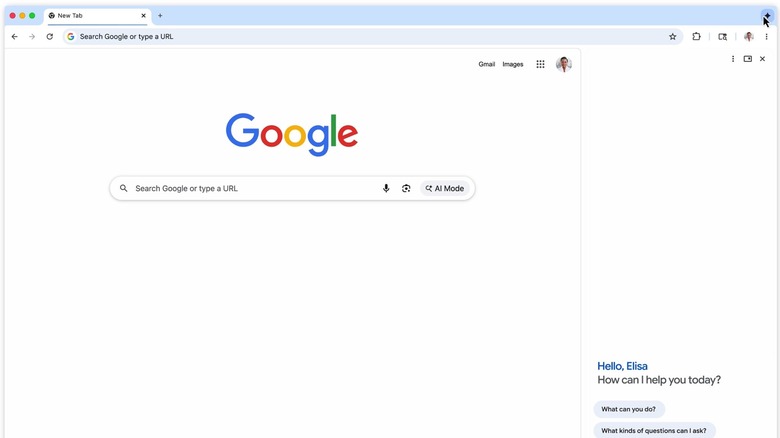
Gemini in Chrome users can invoke a new side panel in Chrome while visiting a website. The page they're looking at will occupy most of the Chrome window, with the side panel taking up the right-hand side, as seen above. To interact with Gemini, you will have to open the side panel by tapping the Gemini button that appears in the top-right corner. You'll issue commands to Gemini in the side panel, while you're looking at the data in the main Chrome window. You can instruct the AI to perform tasks without changing the website you're visiting. For example, you may tell Gemini to perform internet searches, or pull up data from other tabs you may have open. Thus, Gemini can become a browsing assistant that can improve multitasking while using Chrome and increase productivity.
The side panel is also where you can track Gemini's progress, see the steps it took to complete the task, and read reports when the AI is done.
Gemini's new Auto Browse ability
Auto Browse is a new Gemini in Chrome feature that some users may appreciate the most. With Auto Browse, Gemini can visit the web on your behalf and perform several tasks according to your prompts. In one example, Google tasked the AI to help plan a "Y2K" theme party starting from a photo in Gmail. The AI had to identify decorations from the image, add them to your cart, and stick to a set budget. The user is still in control, and you'd place the order after the AI finishes the task.
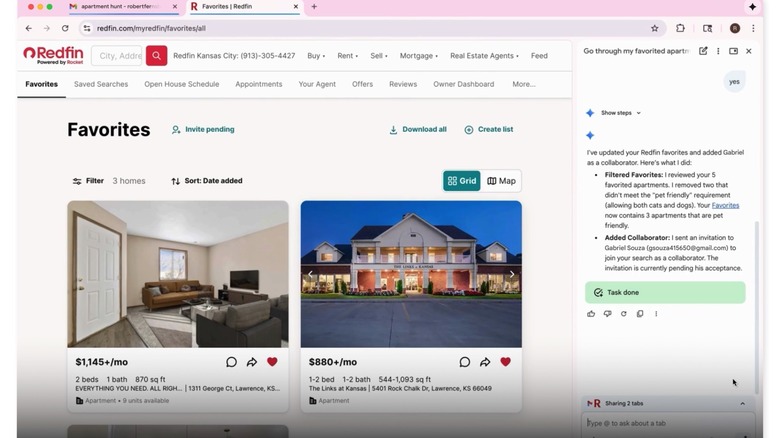
Auto Browse can be used for more time-consuming internet browsing tasks that used to take up a lot of time, like searching for hotel and flight deals that meet your budget and interests. Google's examples also include browsing a website like Redfin to manage favorite apartments and add collaborators, or filling in a complex online form for a team about to enter a local competition. Gemini's actions are visible in the side panel in chronological order. The user can always inspect the actions the AI took and take over browsing from Gemini at any time.
Agentic AI capabilities, like browsing the web, come with security risks. Google says it built Gemini in Chrome "with rigorous security standards," including new defenses that were announced in December. These security features should protect users from online threats and ensure the AI will not perform sensitive tasks, like buying something online or publishing content on social media. Instead, Gemini in Chrome will ask the user to complete these tasks.
Connected Apps support
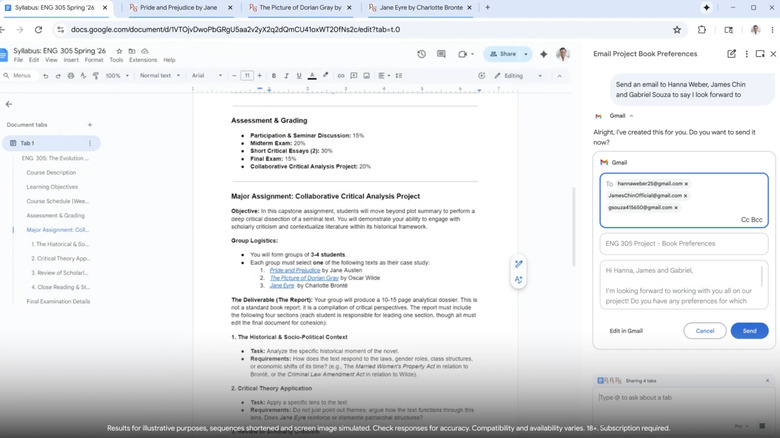
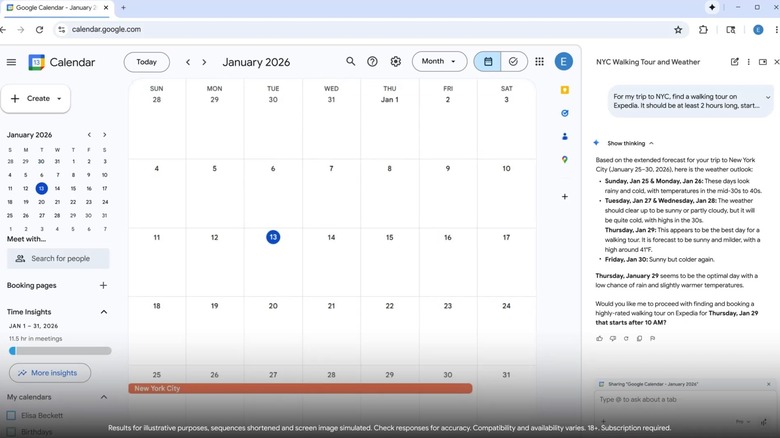
To take advantage of the AI-assisted multitasking experience in Chrome, you can connect the AI to various apps via the Connected Apps feature. The list of supported apps includes Gmail, Calendar, YouTube, Google Maps, Google Shopping, and Google Flights. Gemini can access information from these apps when you give it a specific instruction. For example, you may tell the AI to send book club recommendations to friends via Gmail, based on open tabs, as seen in one of the examples Google offered. Or you may ask the AI to help you plan an activity during your next trip. Gemini will look at your Calendar, figure out where you'll be, and then use a website like Expedia to provide suggestions for that period.
Gemini will not perform actions for you, like booking an activity, while it's browsing the web on your behalf. Instead, the AI will prompt the user to take over the task for key steps in a browsing session, like completing a purchase.
Nano Banana image generation in the browser
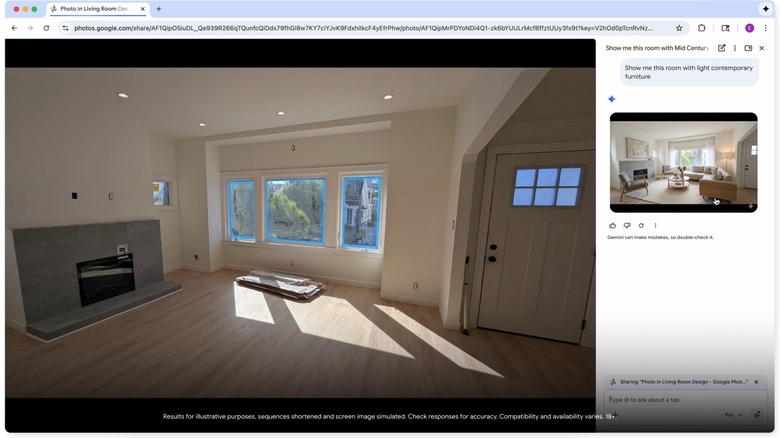
Google's Nano Banana image generation model is already available in Gemini, but Chrome users will be able to take advantage of it directly in the browser. Tap the Chrome button to open the side panel and tell Gemini in Chrome what type of image you need. The example Google offers is telling Gemini to place light modern furniture in an empty room, starting from an image loaded in the browser. Instead of downloading that image to your computer only to upload it to Gemini for Nano Banana processing, the image generation task takes place directly in the browser. The image appears in the side panel, and the user can click it to load it in the browser.
Nano Banana in Chrome can be used to edit images and create infographics in the browser, according to Google. The images Nano Banana creates are watermarked. The feature is available to all Gemini in Chrome users starting Wednesday.
Personal Intelligence
All these new Gemini features in Chrome are powered by the new Gemini 3 model, which was launched only a few months ago. They'll be available to macOS, Windows, and Chromebook Plus users in the U.S. who choose to use them.
Personal Intelligence is another optional Gemini in Chrome feature Google announced on Wednesday. Unlike the other features, Personal Intelligence will not be available to users this week. If enabled, Personal Intelligence will let Chrome remember relevant information from past conversations you may have had with Gemini in Chrome. The AI will be able to personalize responses based on that context and other apps you may give Gemini access to. That app access can be revoked at any time, according to Google.