

11 Mistakes Everyone Makes When Shopping On Amazon
Amazon is one of the most convenient online shopping stores since you can quickly grab everything in one place. However, it comes with many invisible traps that are easy to miss when you're in a hurry, distracted, tired, or just trying to get a quick deal and move on to other things. Dynamic pricing is a thing on Amazon, which means the first offer you see won't necessarily be the best deal. Algorithmic factors push certain sellers higher than the rest, and low-quality reviews can make bad products seem better than they actually are. On top of all this, Amazon's interface is optimized to quickly get you through checkout, giving you no time to slow down and think about your purchases.
Fortunately, you can still squeeze lots of value out of Amazon if you shop like a skeptic rather than just trusting the platform's reputation. We'll start by looking at 11 mistakes almost everyone makes when shopping on Amazon and how you can avoid them, starting with your next order. They revolve around a bit of prepping, a simple checklist, and a couple of guardrails. These things will not only help you avoid paying more than you should but also help you sidestep products you should think twice about and keep your account safer.
1. Assumption that Amazon offers the lowest prices
Yes, you can land on cheap products on Amazon, but this doesn't mean it's automatically the cheapest. Averages can hide what matters to you, like specific items that would be much cheaper on a brand's own site or at other stores like Walmart. Amazon's Buy Box uses algorithmic pricing to highlight sellers, even when their prices are not the lowest available on the same product page.
In a nutshell, the seemingly good price you see first may seem convenient, but you may get an even better deal if you dig a little deeper. It would only be prudent to treat Amazon like one column in a comparison table and do a quick search of the same product you want to buy on at least one competitor. Even better, check the brand's official site if possible. If the price is more than a few bucks cheaper on the alternative sites, get it from there. You could save a lot, especially on big purchases or things you buy regularly.
2. Shopping without a list

Opening the Amazon app or website without a clear purchasing plan is how most people find their buys overshooting their budgets. When you get on without a written shopping list, you'll be letting the site decide for you what your needs are. How? It'll recommend new items, show you underpriced add-ons that feel harmless, and many other upsells that make you believe you need them, but you probably don't. Studies show that people who write a shopping list are less likely to make impulse purchases, and when we talk about writing, we mean physical writing. These studies also show that pre-planning individual expenses leads to fewer items being added to digital carts like Amazon and significantly lower overall spending.
When you visit Amazon with a physical list, it will do two jobs. First, it will protect you from the upsell rabbit hole. Second, if an item isn't on your list, you at least have the chance to stop and evaluate whether you really need it. Shopping lists are easy to write, but make sure you do it before visiting Amazon, estimate your budget per item, and stick to it, just as you would when buying in a physical store.
3. Buying from random sellers
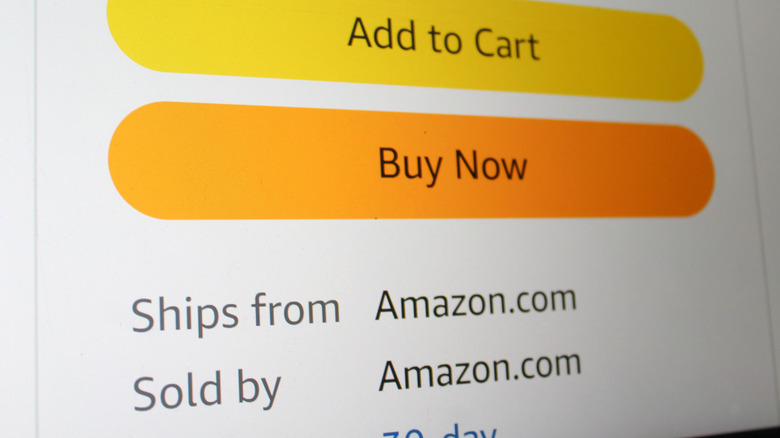
The rule of thumb here is that Ships From Amazon and Sold by Amazon.com are two separate things. You'll find these labels under the Add to Cart and Buy Now buttons. Ships from Amazon means the item you're seeing ships from Amazon, but the product itself is sold by a third-party seller, and the latter's name will always be visible. So, when you buy from a random third-party seller, you'll be betting on their quality control and honesty about whether their product is brand new or genuine. Counterfeit and low-quality items sometimes slip through third-party sellers, especially in product categories like chargers and branded accessories.
Amazon is cracking down on this issue, but the incentives still exist. A third-party seller may undercut the main listing and then silently ship lower-quality products after they get their ratings up. As a buyer, you'll see the same product page, but you are not buying the real product that got all those glowing reviews from earlier buyers.
To be safe, always opt for one of these three options: look for the Sold by Amazon.com label under the Buy Now button, the brand's Amazon storefront, or a well-known retailer with a presence on Amazon. If buying from a small, random seller, scrutinize their ratings and recent feedback, and be sure to compare them with other sellers. Those few extra clicks or taps may save you from sketchy products.
4. Trusting every product review
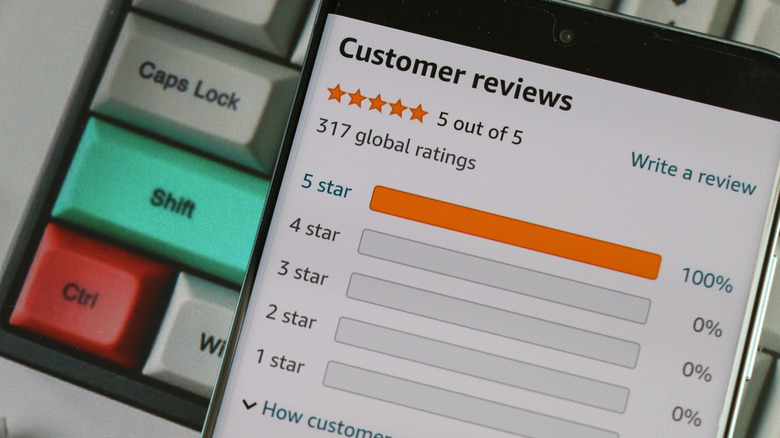
You are probably already aware that some Amazon reviews might be fake, and it's a proven fact. Analyses show that about 30% of online reviews on major e-commerce sites like Amazon may be fake or disingenuous. This figure goes higher than 50% on some specific product categories like electronics and apparels and accessories. On Amazon specifically, it's estimated that about a third of reviews are unreliable, and the company itself has previously confirmed that it either blocked or removed millions of fake reviews in a single year.
However, this doesn't mean you should ignore reviews completely; you just have to be a bit eagle-eyed and look out for red flags. Some of these include generic AI-generated wording, overly glowing reviews raving about receiving free gifts, and shady rating patterns in which a product with almost no reviews jumps to hundreds of five-star reviews within a short time frame. Also, watch out for overly polished, extremely detailed reviews that read like borderline marketing copy rather than a normal customer rant.
To get a better glimpse of what buyers think of a particular product, sort the reviews by Most recent. Once you do so, skim through the four and three-star reviews first. These ratings, in most cases, highlight the product's real pros and cons rather than extremes. Also, prioritize reviews with buyer photos/videos, confirm whether a specific claim or flaw has been highlighted by multiple reviewers, and be extra keen when it comes to unfamiliar off-brand gadgets and electronics with thousands of glowing reviews.
5. Ignoring product descriptions
Failing to read product details is one of the fastest and surest ways to receive and have to return underwhelming tech from Amazon. As an Amazon shopper, you've probably at least once trusted a product based on the photos and title alone, without reading the description. You may get away with this when buying from trusted Amazon sellers, but things could go wrong if you land on the bad ones. Sellers know that most people just skim through product pages, so they front-load the best-sounding details in the product title and the images. The more critical info, for example, short cables, lower refresh rates, refurbished status, or smaller capacities, will be buried deeper in the description text.
Sometimes, reading the description closely may reveal that a brand uses inferior materials or has downgraded parts long after older reviews were published. For these reasons, make scrolling past just the marketing images a habit, and always read the bullet points and the full description each time you want to order an item on Amazon. Pay extra attention to electronic gadgets, clothing, furniture, tools, and anything with sizing. Double-check included accessories, dimensions, compatibility, warranty, and whether you're buying a used, refurbished, or new item. These checks should take you less than an extra minute and may be the difference between getting the right product and feeling like you've been fleeced of your hard-earned money.
6. Not doing prior research before buying on Amazon

You should always scrutinize Amazon product descriptions and reviews, but your research shouldn't end there. Before committing to any purchase, especially a long-term investment like tech gadgets, go to your favorite search engine or YouTube. Do a quick search centered around the product's name, followed by words like review, alternatives, benefits, issues, etc. Review at least one article or video that showcases real-world, everyday use. Of course, you don't have to do this for stuff like a $10 USB-C cable — reserve it for big buys like smartphones, computers, TVs, vacuum cleaners, and the like.
Independent reviewers and product review YouTube channels usually do a lot more than just showcase product features. They go deeper by testing claims such as battery life and durability, as well as by comparing them with similar competing products. Occasionally, a reviewer may mention an alternative product which you may find more worthwhile depending on your needs — something Amazon's search algorithm cannot do. For instance, in our article recommending the best outdoor speakers, we included cheaper alternatives for some of our recommendations to cater to people on tight budgets.
7. Falling for urgency tactics
Like any typical online shopping platform, Amazon is pretty good at making you feel like you are about to miss out big time if you don't purchase something. Countdown timers, x number of people bought this in the last 24 hours, only 1 left in stock, and crazy deals — such messages are designed to create a sense of urgency and scarcity to get you over the line if you were about to rethink making a purchase. Urgency messaging increases the probability of impulse buying and can lead to less deliberate decision-making among online buyers.
When you get rushed, you may find yourself deciding to buy and figure things out later instead of doing at least the basic checks that you'd normally do. On Amazon, that translates to skipping product reviews, reading the description, doing external research, or checking whether you really need whatever product is being presented to you. But you can easily avoid this mistake by simply taking a pause. If the deal presented to you is good and it's on something you already had on your shopping list, buy it — if it wasn't, add it to your wishlist and let it sit there for a day or two. In most cases, the urge to grab it fades, and if the deal ends, there will always be another one, especially around big Amazon sale events.
8. Going for the latest product when it comes out
Unless you genuinely need a specific gadget right away or you demand the latest possible items, purchasing new releases is the most expensive way to buy. At this stage of a product's cycle, demand is usually high, meaning the price will be at its highest. If you care about getting the best or good prices, you should wait for this hype window to pass or wait for specific shopping periods.
Prime Day, Cyber Monday, back-to-school, and Black Friday are some of the best times to hold out for. During these major sale periods, tech gadgets are heavily discounted, especially for older generations, if you don't mind those. Besides great pricing, one of the reasons we highly recommend going back at least a generation with gadgets like phones and tablets is that modern tech doesn't change much.
For example, in most real-world use cases, last year's iPhone should be at the very least functionally identical to the current one. The same applies to laptops, TVs, and tablets. This one-year difference can mean up to hundreds of dollars in price difference. Multiply that by a couple of more upgrade cycles from your side, and this timing alone could save you thousands of dollars.
9. Not double-checking details before checkout
Once you reach the Place Your Order stage when shopping on Amazon, it's prudent to review your cart before you're billed. Ensure you have the correct quantity, color, size, or even your shipping address in case you entered or chose the wrong thing. Also, remember what we pointed out at the beginning of this article — Amazon's checkout is seamless by design, giving you little time to stop and think. This fact makes it even harder to catch any mistakes, so spare a minute to check every detail lest you end up with the wrong package at your door.
You can definitely fix most of these errors by returning the item, but it comes at a cost of your valuable time. Conventional wisdom here is to check the quantity, variant, seller, and the shipping speed (whether paid or free). For bigger and more valuable items, always give your payment method and delivery address one more glance. This 30-second habit will save you lots of pain and sweating with cardboard boxes you had no intention of ordering.
10. Not taking advantage of Amazon Prime's offers and free trials
We highly recommend getting Amazon Prime if you're a frequent shopper, but what if you don't do it regularly enough for a subscription to make sense? You should at least test the service, since you are most likely eligible for a 30-day free trial. Besides faster shipping and, most importantly, exclusive deals and discounts when shopping, Prime members are also eligible for many decent perks. If you're a student, you will get a six-month trial instead, and then a discounted rate should you choose to start paying after it ends. There's basically no reason why you shouldn't give the free trial a shot.
Of course, these trials are a subscription trap, but only if you fail to use them strategically. Being strategic means starting your trial at a time when you know you'll be shopping heavily. This could be a holiday season, back-to-school shopping, and big life events like birthdays and weddings. Events like Prime Day are exclusive to members only, so grabbing your free trial during this period will grant access to some nice discounts without you having to commit to a full subscription. You can then swiftly cancel once the math doesn't favor you in normal months of the year. If you're lucky, you could still be eligible for more trials even after you exhaust your first one — Amazon will let you know which ones and when.
11. Not using 2-factor authentication/passkey to protect Amazon accounts
Your Amazon account isn't just a place for your shopping history; it also contains sensitive personal data, addresses, and a gateway to your payment methods. If a bad actor gets a hold of your account, they could do a lot of damage, starting with buying and sending stuff to themselves or stealing your identity. Two-factor authentication (2FA) or two-step verification (2SV), as Amazon calls it, is a critical additional security layer that will request a passkey or one-time code besides your password. 2FA is the best way to keep malicious actors out of your Amazon account, even if they crack your password. They will still need to have your phone or authenticator app to get in.
To turn on 2FA on Amazon, go to Accounts & Lists > Account > Login & security > Two-Step Verification settings, and then pick between using SMS codes, an authenticator app, or a passkey. Once you use it on your personal devices, you won't have to worry about always going through the two steps if you set them as trusted. Any other new devices that try to access your account will be locked out unless you're the one trying to log in. This simple security setting will close any backdoor in your digital life, especially those that involve money.