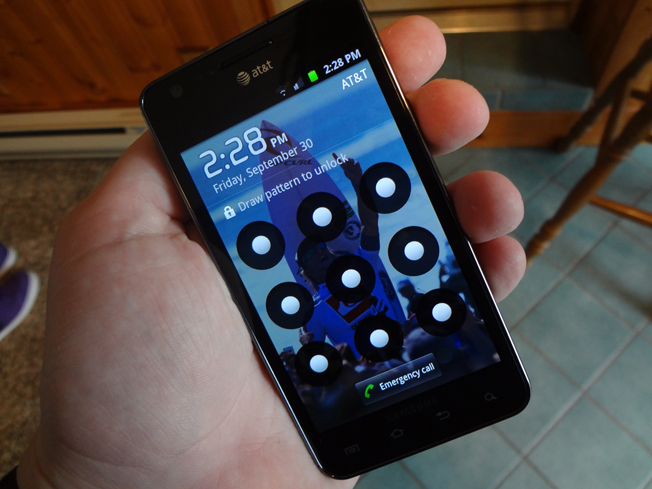
Major security flaw lets anyone bypass AT&T Samsung Galaxy S II security [updated]

Exclusive

BGR has uncovered a major security flaw on AT&T’s version of the Samsung Galaxy S II that renders Android’s security lock feature completely useless. Using a simple workaround, the security hole allows anyone to bypass the unlock pattern, which normally denies users access to an Android device unless a preset pattern is drawn on a grid of nine dots spread across the device’s lock screen. The same flaw allows users to bypass PIN security as well. We have confirmed that the flaw exists on AT&T’s Galaxy S II and not on Sprint’s Galaxy S II, Epic Touch 4G, though it is currently unclear if other phone models are affected. Hit the break for details on the flaw.

Updated with statement from Samsung.

If you have a PIN or an unlock pattern set, all you have to do in order to bypass it is simply tap the lock button to wake the display and then let the screen time out and go black. Tap the lock button again and low and behold, the unlock screen is gone and the phone can be accessed with no PIN or pattern input whatsoever.

This security workaround exists as long as the phone has been successfully unlocked using the proper pattern or PIN at least one time, so the lock cannot be bypassed immediately after the device is powered on. Of course the first thing a user does after powering on a phone is unlock it, so lost and unattended devices are at risk unless they have been powered off since last being used. Of note, users with Microsoft Exchange security policies don’t seem to be affected.

A Samsung spokesperson responded to BGR’s inquiry, stating that the company is investigating the possible security threat but no further comment is available at this time. An AT&T spokesperson declined to comment.

Additional reporting by Todd Haselton. Updated to reflect that the flaw exists for PIN security as well.

UPDATE: Samsung issued the following statement in regards to the bug:

Samsung and AT&T are aware of the user interface issue on the Galaxy S II with AT&T. Currently, when using a security screen lock on the device, the default setting is for a screen timeout. If a user presses the power button on the device after the timeout period it will always require a password. If a user presses the power button on the phone before the timeout period, the device requests a password – but the password is not actually necessary to unlock it.

Samsung and AT&T are investigating a permanent solution. In the meantime, owners of the Galaxy S II can remedy the situation by re-setting their time-out screen to the “immediately” setting. This is done by going to the Settings ->Location and Security->Screen unlock settings->Timeout->Immediately.


144 Comments
  • Timbrando

    No one’s Samsung Galaxy S II has randomly rebooted eh? I await the reviews from real consumers who dealt with the Captivate on Sunday. 

  • homescrub

    Still won’t deter me from wanting to get it.  If you’re smart enough, you’ll make sure not to be dumb enough to lose your phone.

  • Madmanupacreack

    WOW what a bunch of GEEKS ! Are u kidding me over cell phones get a life ! With everything going on in the US this is what argue about again WOW !!!! o and by the way I know creek is spelled wrong .

  • Timbrando

    They should add if you have Lookout Security installed on the phone and its lost you can remote wipe the phone so all the data is gone. Come on offer some solutions. Tabloid trash

  • http://www.facebook.com/people/Michael-Perez/100001642094127 Michael Perez

    Well we all know what iOS5 is bringing to the table. We have to see what the iPhone 5′s hardware is capable of. We haven’t seen (real) or reliable information about ICS. So all is going down in the next few days, finally i can decide what phone to get. Prime or 5.

  • Anonymous

     to an Android device unless a preset pattern is drawn on a grid of nine dots spread across the device’s lock screen. The same flaw allows users to bypass PIN security as well. We have confirmed that the flaw exists on AT&T’s Galaxy S II and not on Sprint’s Galaxy S II, Epic Touch 4G, though it is currently unclear if other phone models are

  • Anonymous

    R’s inquiry, stating that the company is investigating the possible security threat but no further comment is availabl

  • http://briefmobile.com/ Korey Nicholson

    My Epic 4G Touch does have this problem. :)

  • Ras752000

    So when’s the full review going to be posted?

  • Spinkston60

    well not ever having an android phone I can say I demo’d the Sprint’s version and all u have to do on it is call the phone…answer the phone…hang up and you are in….no pin no pattern nothing….

  • Dan Arnold

    Confirmed here on my new SGSII on AT&T. Spread this around so people who have these devices find out and change their settings! I changed mine to lock immediately.

  • http://pulse.yahoo.com/_NP2IIORKV2W7W5NOKBF4ASPKGA john

    Well at least the antenna works.

  • s2user

    I don’t really see this in my phone. My phone doesn’t have this security problem, I tried it several times. I don’t know why these guys don’t test the phones after they are released and update these kind of sh***y news.

  • Intersion

    Same thing happens when you root an HTC Thunderbolt, you can easily bypass the pin lock by rebooting.

  • Anonymous

    I tried replicating this the first time on my ne SGS II and it did happen but then I realized something… go to Settings > Location and security > Timeout.

    If you set it to immediately this “security bug” will never happen.  If you put it at 30 mins then this “bug” is replicated.

1 2 3
blog comments powered by Disqus