Google Voice for iPhone hands-on!

mobile

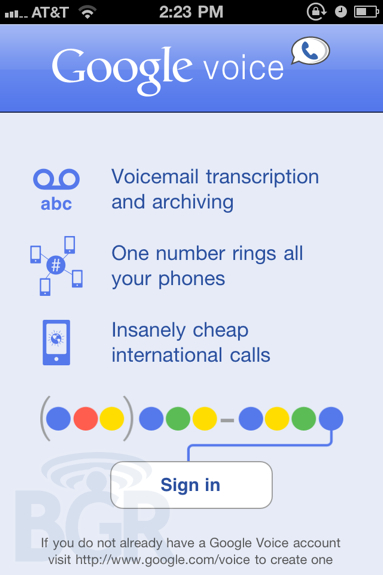
Apple finally approved (or accepted) Google’s official Google Voice app for the iPhone just minutes ago, and while 3rd party versions of the software were allowed back in a couple months ago, sometimes there isn’t anything like the official version. We messed around with the app and here are some of our initial thoughts:

  • We love how straight forward the app is to use. You’d think this would be the case for any application, but Google really nails the usability angle here.
  • Dialing a number quickly and efficiently is the most important part of a phone calling app, and since you have to manually switch to another app and not the iPhone phone app, you don’t want to waste more time by jumping around tabs, and different screen views. On here, hit the dialer tab, and you’re ready to dial. Also of note: Google Voice for iPhone makes use of outbound dialing, so you never have to wait for an incoming call to ring your phone, you just “dial out”.
  • One major issue with Google Voice’s web apps and iPhone-optimized website, was that the experience was kind of lousy. You’d want to dial or shoot a quick text message off but couldn’t due to the fact the entire UI was in Safari, thus it scrolled around, sometimes would be a little delayed, etc. The app provides very quick access to SMS creation and sending, especially for conversations not yet started. This is important here, because the faster these tasks get, the more people will use Google Voice and centralize their calling/texting habits and behaviors.
  • The inbox view is great — you have all your voicemails, incoming calls, missed calls, text messages and recorded calls in one neat, and super clean-looking list. You can also manually view just a specific category like voicemails or text message if you’d like, however.
  • Push notifications on here are lightning fast, and are so, so necessary.

All in all, this is close enough to an integrated experience like Android offers to make iPhone-using Google Voice users extremely happy. Now if they could only work on their voicemail transcriptions… Check out our hands on photos in the gallery!

41 Comments
  • http://c0rinne.net Corinne

    So far, I love. All I need is to be able to “Mark As Read” my voicemails. The transcriptions are ok for what I need and I really never listen to my voicemails anyway. I just like keeping things organized. Even my gmail inbox is empty, and I have thousands upon thousands of emails labeled and archived (and marked as read).

  • Mikekraz

    The app is simple, however unless your Google contacts are all in My Contacts group, they don’t show up. Not using their groups is a big omission.

  • Goofan (aka Apple Hater)

    Why? Norm and I know that the iPhone will be out of the market by the end of February. We have deals coming for Christmas, buy one Droid and get 400 free ones coming up on Verizon and AT&T will do similar deals but up to 500 phones and tablets.

    • Anonymous

      LOL…ur funny. U tour in Vegas at all?

    • Anonymous

      So what are you good at? Pretty pathetic if you suck at trolling…

  • Anonymous

    Total waste IMO. Then again, other than a Search Engine most of the Google stuff is crap.

    • http://twitter.com/nickdube Nicholas DubĂ©

      ….? explain

  • Anonymous

    Total waste IMO. Then again, other than a Search Engine most of the Google stuff is crap.

  • Los4825

    every time you call someone, it dials a different number…not good if you have A-List from AT&T!!!

    • Anonymous

      Yep. That is my only complaint of the official Google Voice app.

      At least with GV Mobile +, using direct dial uses the SAME access number for all contacts. So all you have to do is add your real GV number and this special access number to your A-list.

      I’m glad I have both apps, but until Google changes this, I think I’ll stick with GV Mobile + and Boxcar for notifications.

  • Jr67

    Preferred callback dialing, mainly because I had unlimited incoming calls on my plan. At least GV Mobile+ allows you to select which method to use…wonder why the official app doesn’t allow this to be configured.

    Anyone trying to use it in Canada? Again using GV with GVMobile+ works perfectly here, but this app keeps trying to dial out and I get an “Unable to complete your call” recording. The outbound numbers might be setup to only accept calls from US phones.

  • jgb

    So, when you select a contact to dial, the app triggers a dialout to an access number.

    You have to pay long distance charges to call someone across town? Cause it looks like the access numbers are not local to me.

    • Anonymous

      Dude, not one carrier in the US charges long distance.

  • Anonymous

    works pretty well. I dont like that it puts a sending contact’s phone number right next to their name in a text message, just looks messy.

  • Anonymous

    i tried texting my iphone from another phone and it didnt push anything. had to load the app and go to inbox to see the message. App even asked me to set notifications on and i checked in settings.

    sticking with gvm+

  • Anonymous

    Question for GV experts: I have my GV number “forwarded” to my cell number for voice calls. However, this has one undesired effect, although I receive telephone calls on my cell (as desired) when someone dials my GV number, I receive 2 txts on my cell when someone txts my GV number (one txt comes into the GV app, the other comes into my iPhone txt app presumably because it was “forwarded” by GV to my cell #).Clearly I dont want 2 copies of each txt esp since I have limited monthly txts via AT&T (would prefer to get them all through GV). Im sure there is something simple I am missing, but I cant seem to find the workaround such that my voice calls to my GV number are forwarded to my cell, but not txts to my GV number. Any thoughts?

    • Anonymous

      Go to settings on the google voice website. Uncheck the forward to number. Then you still get messages, but not twice.

      • Anonymous

        thx tim, tried that, problem is that then all voice calls (to my GV number) go directly to voicemail, and are not forwarded to my cell phone number (i.e., my handset)

      • Anonymous

        Once you are in the settings, click on ra the voice mail/text tab. Then go down to text forwarding and uncheck that box.

      • Anonymous

        Be sure to uncheck the forward voicemail as well. If not, you will get those twice as well. Glad you guys with iphones got this. Hope it works as good as our version.

      • Anonymous

        yup that’s unchecked already; i still get two text messages (one to GV, one to iPhone/ATT message app)

        my guess is one cannot have voice calls forwarded to your cell number and NOT also have txts forwarded; thus, the choice is either to have every phone call to GV number go immediately to voicemail, or to let phone calls go through to handset but also receive two texts every time one is sent to the GV number

      • Anonymous

        I only get the gv notification on my EVO. Check your gv settings from the phone as well.

      • Anonymous

        I think i found the resolution, at least for ATT/iPhone GV app:

        1. in GV settings (online), under “phones,” the “Forwards to mobile #” box must be checked in order for voice calls to go through to handset, and not directly to voicemail; AND

        2. in GV settings (online), under “voicemail & text,” the “Text Forwarding” box has to be unchecked, AND

        3. in GV settings (online), under “phones,” you also have to click on “Edit” (for your mobile phone) and uncheck the “Receive text messages on this phone” option.

        By doing the above three items, I now get voice calls on my handset (i.e., they no longer go directly to voicemail) AND I only get one txt message on my GV app.

    • BM

      Go to the gvoice website. The settings are there and not in the app.

    • Ss3ann

      you can either disable the notification alert for google voice app on the iphone under settings then notifications then slide off the alert for google voice or…. you can login to google voice and disable the text forwarding from the website.

  • Norm

    DROID DOES this better. I don’t care if there is an App for this it will never be as good as DROIDs. DROID offers a full google experience, which is the best experiences. The iphone doesn’t DOES as good as DROID, plain and simple.

    • Anonymous

      I’m not even sure what it is you’re trying to say, but that might’ve been the most unintentionally funny comment I’ve ever read on BGR.

    • Anonymous

      I find it amusing how fandroids slam Apple users for falling for marketing and then they go around screaming “DROID DOES” like that actually means anything.

  • Kemck

    i downloaded and installed and all i get is a blank screen with Favorites and More at the bottom of the screen… it is not working for me… any thoughts?

  • Matt

    Funny how the people in JobsWorld can’t seem to figure out how to use something that has been around for so long on Android…just another example of how iOS is so ancient.

    • Norm

      While I’m like you and would suck off a DROID if it had the right piece of anatomy…I think Iphone owners are confused because Google Voice is useless and a pain in the ass, though good for prank calls and giving your number out to people you never want to talk to.

      • http://www.youtube.com/watch?v=WiQmQhA-OrM Walter Sobchak

        Or….. If you do business, and want to set up times it can ring to your mobile.
        Or…. If you want free visual voicemail with transcripts.
        Or…. If you want to send free SMS.
        Or…. If you have friends overseas and want to call their mobiles on the cheap right from your mobile.
        Or…. If you want your number to ring up to your home phone, work phone, and mobile phone.
        Or…. If you want to easily check your voicemail right from your gmail when traveling abroad.

        You know, Glansburg, you are no better than the people that irrationally hate your iphone. You’re just a tool dude.

      • http://www.twitter.com/noetic_hatter Noetic_Hatter

        Well-said! Voice is crazy useful, even if all you used it for was to be your voicemail system.

        Thanks to transcripts – and a Voice plugin for desktop Chrome – I haven’t listened to more than about 10% of my voicemails since I started using the service on my android phone in Feb.

  • Gaius

    You forgot to mention that this App does NOT install for anybody with an iPod Touch so people can forget about making calls over wifi like they can by using the Gmail interface for GV. This app still uses your minutes so I suggest anybody on AT&T add their Google Voice number to their “A-list” so they can get truly free unlimited calling on GV.

    • http://twitter.com/JessSimpson13 Jess Simpson

      That is one reason I love the GV app for Android, with the GVmynumber app addon all your GV calls go out thru your GV number (it just dials your GV number then * then your code then 2 then the number your calling then #) so you can still use the friends and family calling trick.

  • Amillionhomes

    My GV I-app is a blank screen like several others here,,,,,I don’t love Google Voice because I have to use my ATT minutes. Yes it has some cool functionality but it’s a gimmick for me.

  • Jules

    For a serious texter this is a usability disaster and a huge disappointment. I really was expecting something better from Google who generally get that user experience is a huge part of success.

    The modal ‘sending’ dialog is very 1990′s and then ‘ok’ to confirm that the message was sent is misguided at best. What about visual indications? What about emulating the excellent Android version of Voice? Or even the honest-to-goodness built-in Messages app in the iPhone itself.

  • Justin

    I only use Google Voice for voicemail services on my iPhone, but I have to say that the official app is much more reliable than the GV Mobile +. When even I would tried to listen to voicemails, GV Mobile would always have a difficult time downloading them, but with the new official app it works every time. The official app has less features, but it works and is reliable which is really important to me.

  • http://www.twitter.com/noetic_hatter Noetic_Hatter

    I was already using Voice for my voicemails and for the occasional SMS. But as soon as the app was announced and installed, I lowered by texting plan.

    This app is the one thing I missed from my ERIS. GV+ was a decent alternative. But not having push notifications of text messages made it all by worthless for changing over to using the Voice number 90% of the time.

    Now I can use GV+ with a second Voice number to make outbound calls to people I don’t want to know my regular number.

  • Fastwalking

    Does anyone know why it’s not available in Canada?

  • Dan Mitchell

    Google Voice was approved 38days ago – still not available in UK – why ?

blog comments powered by Disqus