

BlackBerry OS 6.0 Screenshots, Details!
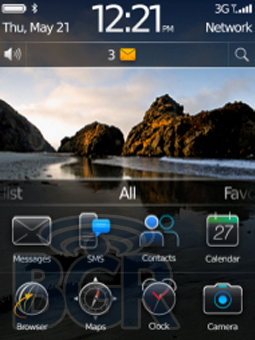
If you're a BlackBerry fan, there is probably not a single thing you have been looking forward to more than what we have right here — screenshots and full details of RIM's upcoming operating system, OS 6.0. One of our AT&T sources has not only showed us the brand new OS, but has also given us some screenshots that we could share. Since we have seen OS 6.0 in action first hand, we will break it down for you guys, along with all the other screenshots, after the break!
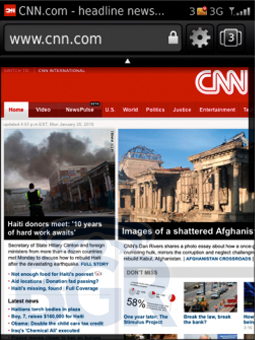
You can see the new browser that RIM has skinned up, complete with tab switching, new favorites, and multitouch. Yes, multitouch. The browser looks like it's coming along quite nicely, all WebKit!
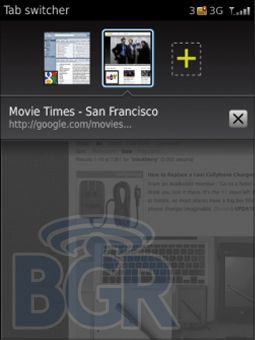
Here's the actual tab switcher view, with nice transparent overlay. No word on how many open tabs you can keep simultaneously.
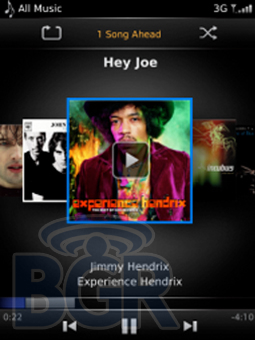
Finally, a redone media player, and it doesn't look half bad, right? The navigation in this view is done by using your finger to browse the album art work and then touching the specific album cover to start playing.
Here is what we can tell you about OS 6.0 that we saw in action... RIM has finally implemented system-wide kinetic scrolling with rubberbanding. This makes the experience a bit more fluid when scrolling through lists, web pages, emails, and the like. There is also multitouch system-wide, from the web browser to the photos application, and yes, pinch to zoom is in there.
Looking at the actual message inbox, things look a bit cleaner, and a bit more modern, but it's obviously not a huge departure from what we have now, just another evolutionary upgrade which is par for the course with RIM. But, we definitely do like the look of the new inbox. It also features larger thumbnails to the left of each message to identify the type of message (Facebook, Twitter, etc.) and we even saw RSS feeds built right in which looked great. We can't describe this part... but the new inbox feels right. It's not all work and dry, and it's not over the top with cheesy graphics or animations, rather a nice compromise of the two.
Something big for OS 6.0 is the homescreen. While we didn't see any sort of widget support, it appears RIM has made the homescreen completely customizable with pages. You can have your applications on the main page, then slide left or right to another page with different applications and browse that way. In the homescreen screenshot above, you'll see a sliding field towards the bottom, and you can slide that up, and reveal the first page of applications, and you can then slide that to show the different groups which correspond to the different homescreen page. Favorites, all, home, etc.
Another big thing for OS 6.0 is modal popups with gestures. If you tap and hold (obviously a touchscreen device is required), you'll get a 9 icon group centered on the screen which is basically a pretty context menu. For instance, you could be composing an email, and instead of pressing Menu + Send, you could tap and hold on the email, see the popup window, and hit the send icon there. Another use would be when emailing photos or videos from your device, just tap and hold on an item there, see the popup, and then just send the item. That way you don't have to deal with going through the normal menu options which has gotten convoluted with all the various social services/networks available.
The photos application we saw looks quite a bit like the iPhone's layout, big tiled square photos that appear in thumbnail view with very small borders, that you can flick that list up or down to navigate. Pictures also appeared on screen instantly, not loading one by one by one until you give up. Once you tap a specific photo, you'll see the picture slide in from the right, sort of like the current animation now when navigating pictures on the BlackBerry. The usual top and bottom UI bars are still here, but if you tap once, just like the iPhone, that view will hide and you'll have a fullscreen shot of the picture you're looking at. There was pinch to zoom on the touch screen device we saw (sorry, we can't comment on the device), but there was absolutely no fluidity when panning around photos. That's something a lot of manufacturers miss, but, it's obviously not the end of the world.
Composing an email looks to be a little bit more straight forward. The UI has nice, clean gradients and a very modern web 2.0-feel. Definitely refreshing. There's also universal search across the system on here... If you haven't got the point yet, OS 6.0 looks to be a very clean and arguably sexy UI for the BlackBerry platform, let's just hope there are some under the hood changes as well. Our source says there are many changes we can't see.
In terms of a release timeframe, we are sure you'll be pleased as punch to find out that we have been told BlackBerry OS 6.0 will be in market in the June / July timeframe, 100%. I said on Twitter I thought RIM was announcing OS 6.0 at WES (not having heard that at the time), and it looks like I might have been right. RIM needs to knock this one out of the park, and you'll know we'll be rooting for them.